Email spoofing is a cyberattack technique where an attacker forges the sender address on an email to make it look like the message came from a trusted person, company, or domain. In many cases, the goal is to trick recipients into opening a malicious link, downloading an attachment, replying with sensitive information, or trusting a message they normally would question.
For businesses, email spoofing is dangerous because it often looks legitimate at first glance. A message may appear to come from a coworker, executive, vendor, or even your own domain. That false sense of trust is what makes spoofing effective.
While many people think spoofing is simply a spam problem, the reality is more complicated. Email spoofing often exposes deeper configuration issues inside the email environment, especially when authentication, forwarding behavior, or trust rules are not set up properly. In one recent client case, that is exactly what we found during a Microsoft 365 security audit.
How Email Spoofing Works
Email spoofing works by manipulating email header information so the message appears to come from someone it did not actually come from. The attacker changes the visible sender details, such as the “From” address, to impersonate a real user or domain.
Because email was not originally built with strong sender verification in mind, spoofing is possible unless proper authentication controls are in place. Without those controls, receiving mail systems may have difficulty determining whether the sender is legitimate or impersonating someone else.
That does not always mean the attacker has access to the real mailbox. In many cases, they do not. They are simply making the message appear trustworthy enough to get through filters or fool the recipient.
Why Attackers Use Email Spoofing
Attackers use email spoofing because it increases the chances that someone will trust the message. A spoofed email may be used to:
- Steal usernames and passwords
- Deliver malware or malicious links
- Impersonate an executive, vendor, or employee
- Trigger fraudulent payments or wire transfers
- Bypass suspicion by making the email look internal
The more familiar the sender appears, the more likely someone is to open the message or act on it.
Why Email Spoofing Is Dangerous for Businesses
Spoofed emails can create serious business risk, especially when they appear to come from internal users or trusted domains. Even if the message is not especially sophisticated, the appearance of legitimacy can cause people to lower their guard.
The risk grows when the environment contains configuration gaps such as:
- Broad safe sender rules
- Shared mailbox forwarding
- Legacy inbox rules
- Weak or missing authentication controls
- Exceptions that bypass normal filtering
When those conditions exist, a spoofed email may not just reach the inbox. It may also move through the environment in a way that makes it look even more trustworthy. That is where many businesses run into trouble.
Email Spoofing vs. Phishing
Email spoofing and phishing are closely related, but they are not the same thing.
| Email spoofing | Phishing |
| The act of falsifying the sender identity to make an email appear legitimate. | The broader attack strategy that uses deception to get someone to click, download, reply, or reveal sensitive information. |
In other words, spoofing is often one tactic used inside a phishing attack. A phishing email may use spoofing to look like it came from someone trustworthy.
Signs of a Spoofed Email
Spoofed emails do not always look obviously malicious. Some are crude, but others are convincing enough to bypass casual review. Warning signs may include:
- A sender name or email address that seems familiar but is slightly off
- Messages that appear internal but feel unusual in tone or timing
- Unexpected requests for urgency, payment, passwords, or sensitive data
- Suspicious links or attachments
- Header details that do not match the visible sender information
For many businesses, the bigger problem is not whether a spoofed message exists. It is whether the environment is configured to detect, inspect, and contain it properly.
A Real-World Example of Email Spoofing in a Business Environment
During a recent Microsoft 365 security audit, a client came to us for a review of their email security posture, Microsoft Defender for Office 365 settings, and broader best-practice hardening. While that work was underway, users started reporting suspicious emails that appeared to come from internal addresses.
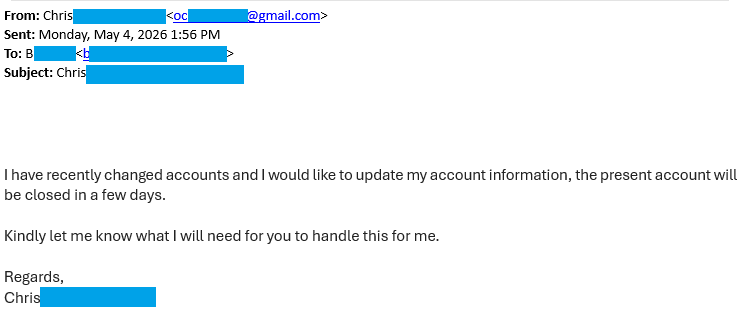
At first, it looked like a standard spoofing issue. But after tracing the message flow, we found something more important.
An external sender spoofed one of the client’s internal email addresses and sent a message to the company’s info@ mailbox. That mailbox then forwarded the message to other internal users. At the same time, a mail flow rule was configured to treat internal users as safe senders. Because the message appeared to come from an internal address and was now moving through an internal path, it bypassed normal filtering and was treated as trusted. That is why it was not blocked the way the client expected, and why Defender did not flag it in the usual way.
The spoofed email was not “beating” the security stack. The environment itself was unintentionally allowing the message to be trusted.
What We Fixed
We removed the internal safe sender entries from the mail flow rule so those messages would be scanned properly again. That immediately reduced the exposure and stopped internal-looking emails from automatically bypassing inspection.
What Else Needed to Be Addressed
We also recommended:
- Reviewing inbox and forwarding rules, especially on the info@ mailbox
- Checking for unintended or risky mailbox routing behavior
- Implementing proper SPF, DKIM, and DMARC
- Tightening any trust-based mail flow rules that were too broad
That client case reinforced an important point: spoofing is often the visible symptom, but the real issue is usually hidden in configuration.
Why SPF, DKIM, and DMARC Matter
SPF, DKIM, and DMARC are the core email authentication controls that help reduce spoofing risk.
SPF tells receiving systems which servers are allowed to send email on behalf of your domain.
DKIM adds a digital signature to outgoing messages so receiving servers can verify that the message was authorized and not altered in transit.
DMARC builds on SPF and DKIM by telling receiving systems what to do when a message fails authentication checks.
Together, these controls make it much harder for attackers to impersonate your domain successfully. Without them, receiving systems have fewer reliable ways to distinguish legitimate email from forged email, and those gaps are not always easy to spot on your own. We offer a free consultation for businesses that would like help reviewing their setup.
How to Help Prevent Email Spoofing
Businesses can reduce the risk of email spoofing by combining authentication, filtering, and configuration hygiene.
The most important steps include:
Implement Email Authentication
Set up and maintain SPF, DKIM, and DMARC correctly. These are foundational controls, not optional extras.
Review Mail Flow Rules
Look for rules that broadly trust internal users, safe senders, or certain message paths. Trust should be narrow, deliberate, and documented.
Audit Shared Mailboxes
Mailboxes like info@, support@, and sales@ often have forwarding behavior or old inbox rules that create hidden risk.
Inspect Forwarding and Inbox Rules
Automatic routing can make malicious messages appear more trustworthy or spread them further inside the organization.
Validate Security Tool Configuration
Tools like Microsoft Defender for Office 365 are only as effective as the policies and exceptions around them.
Train Users to Recognize Red Flags
Even with strong controls in place, users should still know how to spot suspicious internal-looking messages.
What Businesses Should Take Away
Email spoofing is not just a matter of bad emails slipping through. It is often a sign that trust is being applied too broadly somewhere in the environment.
That is why businesses should regularly review:
- Email authentication records
- Mail flow rules
- Shared mailbox behavior
- Forwarding configurations
- Filtering exceptions
- Legacy settings that may no longer be appropriate
In many cases, the biggest vulnerabilities are not the ones businesses actively chose. They are the settings that were added over time and never revisited.
Need Cybersecurity Services in NJ?
If your business is dealing with suspicious internal-looking emails, spoofing concerns, or unusual mailbox behavior, it may be time to review how your Microsoft 365 environment is configured.
We help New Jersey businesses identify hidden email security risks, review authentication and mail flow settings, and fix the kinds of configuration issues that allow spoofed messages to slip through.
Speak With an Expert
Click Here to Request a Free Consultation